# Upload Your Design

## I Upload Your Design

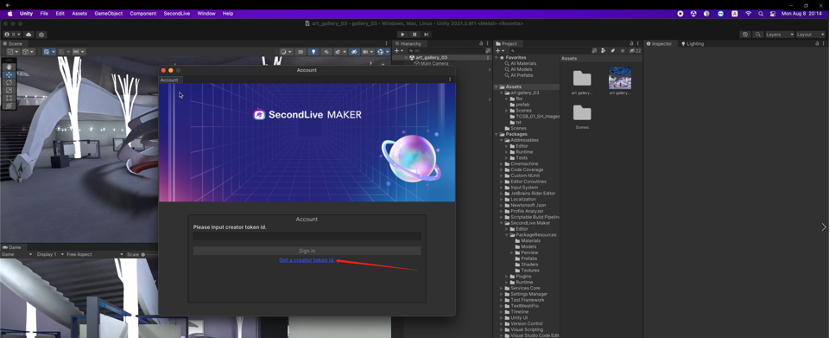
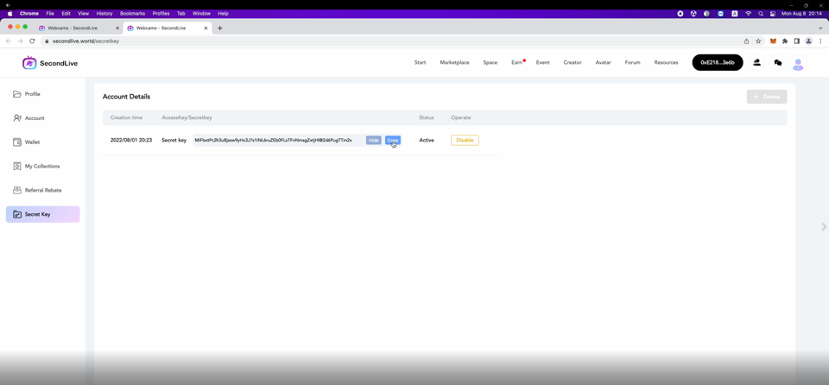
1. After completing all space editing, click “SecondLive” - ”Authorization” on the top of the page. Click “Get a creator token id” in the popup to connect SecondLive for a Secret Key.

<figure><img src="https://946772453-files.gitbook.io/~/files/v0/b/gitbook-x-prod.appspot.com/o/spaces%2FNxlfiLjObdGlxsqsAWuW%2Fuploads%2FMuFjZFdYO8Aonk7sydTN%2Fimage.png?alt=media&#x26;token=7cd0cd76-6503-4a4c-b697-c8d3947c1a33" alt=""><figcaption></figcaption></figure>

<figure><img src="https://946772453-files.gitbook.io/~/files/v0/b/gitbook-x-prod.appspot.com/o/spaces%2FNxlfiLjObdGlxsqsAWuW%2Fuploads%2FWqjwUsHsNVVQapAokQtk%2Fimage.png?alt=media&#x26;token=2d889c40-bb1a-426b-aba4-4f7f727e589f" alt=""><figcaption></figcaption></figure>

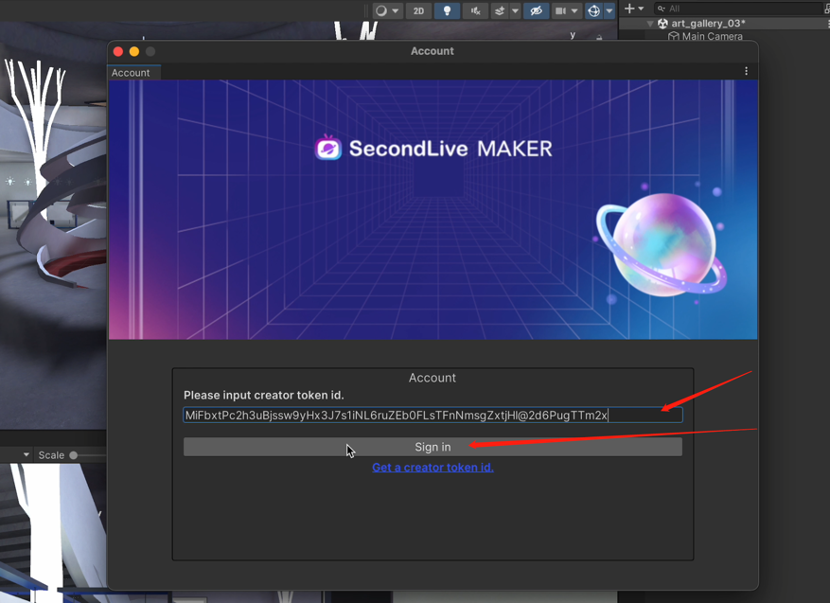
2\. Copy Secret Key and input it in the next popup. Click “Sign in” for the next step.

<figure><img src="https://946772453-files.gitbook.io/~/files/v0/b/gitbook-x-prod.appspot.com/o/spaces%2FNxlfiLjObdGlxsqsAWuW%2Fuploads%2FpGompwfI83mPFYbWv6JB%2Fimage.png?alt=media&#x26;token=0bf69620-fcad-43fe-b86a-17186438d9e9" alt=""><figcaption></figcaption></figure>

<figure><img src="https://946772453-files.gitbook.io/~/files/v0/b/gitbook-x-prod.appspot.com/o/spaces%2FNxlfiLjObdGlxsqsAWuW%2Fuploads%2FRkq0Y6lJ9Y7fpkuuYhAe%2Fimage.png?alt=media&#x26;token=7a014aa9-55c7-44b5-851c-02ddfbf3c75b" alt=""><figcaption></figcaption></figure>

3.After signing in, you can see your SecondLive account information. Close the pop-up.

<figure><img src="https://946772453-files.gitbook.io/~/files/v0/b/gitbook-x-prod.appspot.com/o/spaces%2FNxlfiLjObdGlxsqsAWuW%2Fuploads%2FyP2JbpEGtX54H4ZirNgr%2Fimage.png?alt=media&#x26;token=dba31949-6cf7-4dd4-9b6a-4b4bfa2a547c" alt=""><figcaption></figcaption></figure>

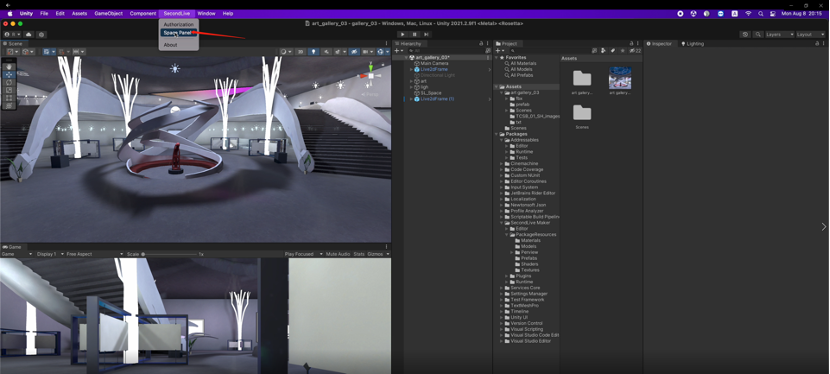
4.Click “SecondLive” - ”Space Panel” to upload resources.(*<mark style="color:red;">**\*Space Creators have 10 upload opportunities per day.**</mark>*)

<figure><img src="https://946772453-files.gitbook.io/~/files/v0/b/gitbook-x-prod.appspot.com/o/spaces%2FNxlfiLjObdGlxsqsAWuW%2Fuploads%2FrMIS1Lfbg3sc3Os5FZE5%2Fimage.png?alt=media&#x26;token=4e8af37b-d62a-499e-a8a1-420446287afd" alt=""><figcaption></figcaption></figure>

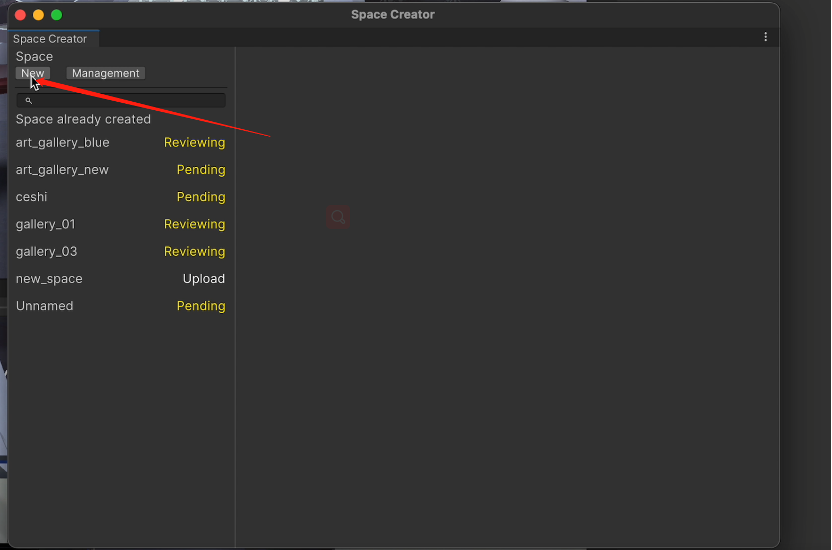
5\. Click “New”.

<figure><img src="https://946772453-files.gitbook.io/~/files/v0/b/gitbook-x-prod.appspot.com/o/spaces%2FNxlfiLjObdGlxsqsAWuW%2Fuploads%2FtIWRsbrxO5QgoHBnozPu%2Fimage.png?alt=media&#x26;token=d42b0010-846d-493e-be7d-1fbd8c0373fa" alt=""><figcaption></figcaption></figure>

6\. Upload the space cover image and enter the name and other information of the space.

<figure><img src="https://946772453-files.gitbook.io/~/files/v0/b/gitbook-x-prod.appspot.com/o/spaces%2FNxlfiLjObdGlxsqsAWuW%2Fuploads%2FqDvLJ8Cwnet6h07UiFgu%2Fimage.png?alt=media&#x26;token=3f0f07ff-499b-4c7d-aa3d-2a2f7b9baeab" alt=""><figcaption></figcaption></figure>

7.A Notice will popup if uploading successfully.

<figure><img src="https://946772453-files.gitbook.io/~/files/v0/b/gitbook-x-prod.appspot.com/o/spaces%2FNxlfiLjObdGlxsqsAWuW%2Fuploads%2FbB2n2T4naCIPU1a4Eg1w%2Fimage.png?alt=media&#x26;token=f215ad46-95c2-4c36-af62-fc53c9cb313d" alt=""><figcaption></figcaption></figure>

8\. Next, you can view the space on the ”Creator Management” page of SecondLive.

<figure><img src="https://946772453-files.gitbook.io/~/files/v0/b/gitbook-x-prod.appspot.com/o/spaces%2FNxlfiLjObdGlxsqsAWuW%2Fuploads%2FzNiXxsPCgPUbxUd3V66G%2Fimage.png?alt=media&#x26;token=6dac125c-f8a8-4796-9395-8ddc650f3c34" alt=""><figcaption></figcaption></figure>

9\. Click “Preview” to view the space.

10\. Click “Sell” to trade the space on SecondLive Marketplace.

11\. Click “Delete” to delete the space.

<figure><img src="https://946772453-files.gitbook.io/~/files/v0/b/gitbook-x-prod.appspot.com/o/spaces%2FNxlfiLjObdGlxsqsAWuW%2Fuploads%2FdCKfLtWxhfl4WuWvNvkN%2Fimage.png?alt=media&#x26;token=5d04e9d6-e7b5-403f-aea5-83d2736a86b4" alt=""><figcaption></figcaption></figure>

##


---

# Agent Instructions: Querying This Documentation

If you need additional information that is not directly available in this page, you can query the documentation dynamically by asking a question.

Perform an HTTP GET request on the current page URL with the `ask` query parameter:

```
GET https://docs.secondlive.world/secondlive-en/creator/space-creator/upload-your-design.md?ask=<question>
```

The question should be specific, self-contained, and written in natural language.
The response will contain a direct answer to the question and relevant excerpts and sources from the documentation.

Use this mechanism when the answer is not explicitly present in the current page, you need clarification or additional context, or you want to retrieve related documentation sections.